The most dangerous fake apps aren’t imitations. They’re the real thing — modified. An attacker takes a genuine, popular APK, opens it up, splices in malicious code, seals it back together, and distributes it through forums, mod sites and chat groups. The result looks perfect because most of it is the original: real icon, real interface, real features, all working exactly as users expect, with surveillance running underneath. This is repackaging, the assembly line behind most “fake app” incidents on Android — and it has one unfixable weakness that takes thirty seconds to check.
The pipeline, step by step
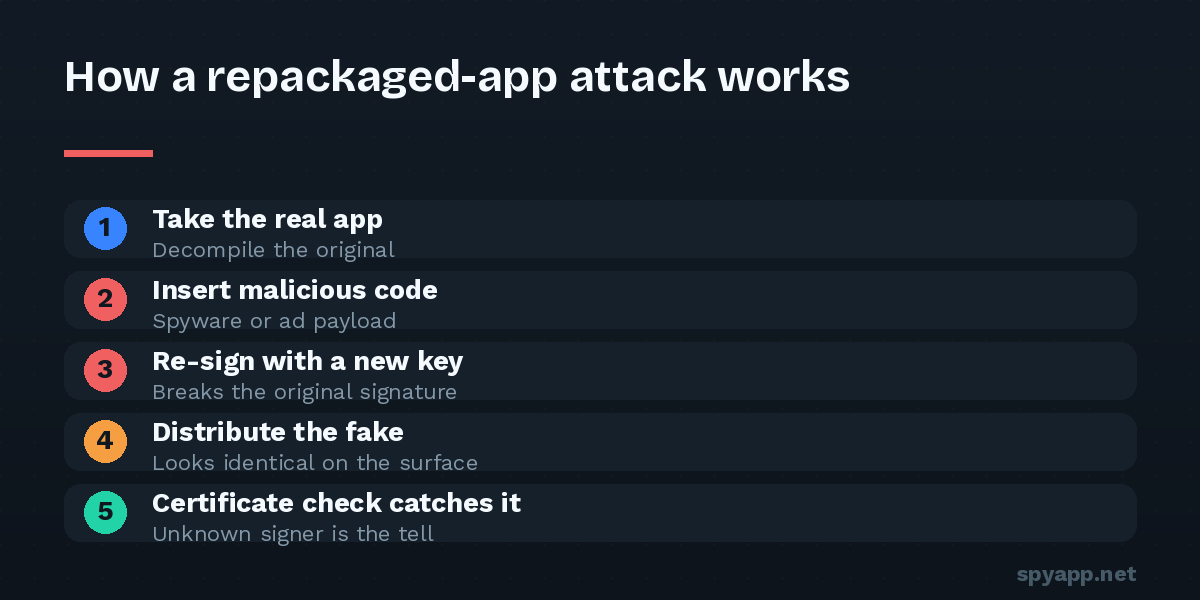
Repackaging is industrialized, not artisanal:
1. Acquire. Download the legitimate APK of a popular app — easy, since published APKs circulate freely.
2. Unpack. An APK is a structured archive; freely available tooling opens it into readable components — manifest, code, resources (our APK anatomy guide tours the contents).
3. Inject. Add the payload: spyware components, a credential-stealing module, an SMS interceptor, aggressive ad SDKs — plus, in the manifest, the permissions the payload needs. Often the attacker also adds the lure that will sell the download: “unlocked premium,” removed ads.
4. Re-sign. The step attackers cannot skip and cannot fake. Android refuses to install unsigned APKs, and the original developer’s signature broke the moment one byte changed. The modifier must sign with their own certificate — they don’t have the developer’s private key, and the mathematics of the system means they never will.
5. Distribute. Mod forums, “free premium” aggregator sites, chat channels, video descriptions, search ads pointing at lookalike download pages. The lure does the marketing; the original app’s quality does the convincing.
Why victims rarely notice
A repackaged app works. The messenger messages, the game plays, the editor edits — the attacker kept all of it, because a broken app gets uninstalled and a working one gets trusted. The malicious additions run where users don’t look: background services uploading data, permission requests rationalized by the lure, one extra SDK among dozens of legitimate ones. Everything visible says “real app,” and everything visible is telling the truth — it just isn’t the whole truth.
What finally surfaces, sometimes weeks later, are side effects: battery and data consumption with no visible cause, logins from strange locations, two-factor codes arriving for requests the victim never made. By then the harvest has been running the whole time.
The unfixable weakness: the signature
Step 4 of the pipeline is where the scheme is permanently exposed. Android’s signing system means a modified app cannot carry the original developer’s certificate — repackaging necessarily replaces the app’s cryptographic identity, however perfect the visual copy. Three practical consequences:
- The certificate check is conclusive. A famous app signed by an unknown certificate is repackaged, period. Our free scanner extracts and reports the signing certificate of every uploaded APK; the certificate explainer covers how to read it.
- Updates betray fakes. Android won’t install an update signed differently from the installed app — which is why fake versions can’t update over real ones, and why a sideloaded app failing to update is worth treating as an alarm.
- The hash settles identity absolutely. Where the developer publishes a SHA-256 checksum, comparing it with your file’s (shown on every scan report) is mathematical proof either way — the hash guide has the ten-second method.
Defending yourself: the routine
Repackaging defeats eyes, not checks. The defense is the standard pre-install routine with two points of emphasis:
- Source skepticism, weighted by the lure. The stronger the “free premium” pitch, the higher the prior that you’re looking at the pipeline’s output — someone did real work modifying that app, and generosity to strangers rarely explains it.
- Scan, then read the two identity lines. Verdict and permissions as always — injected payloads usually add permissions the original never had, a mismatch the report highlights — plus the certificate, and the hash when an official value exists.
- Banking apps: store only. The repackaging economy targets financial apps above all; no lure justifies sideloading one.
If you suspect you’ve already installed a repackaged app: uninstall it, change the passwords of any account you used inside or alongside it (from another device), watch for the spyware symptoms in our warning-signs guide, and scan the APK if you still have it — the report tells you what the payload could access, which tells you what to lock down first.
The takeaway
Fake apps succeed by being almost entirely real — every pixel borrowed from software you already trust. But the one thing repackaging can never borrow is the developer’s cryptographic identity, and Android writes that identity into every APK where a thirty-second check can read it. Attackers know most people never look. Be someone who looks.