Every other malware guide on this site says the same thing: found it? Remove it, now. This article exists because stalkerware is the exception, and the exception can matter enormously. Stalkerware isn’t installed by a stranger monetizing thousands of victims — it’s installed by one person to watch one person, and that person notices when the watching stops. The removal itself is an event the abuser sees. So the safe sequence puts three steps before deletion that no ordinary malware calls for: an honest risk assessment, outside support, and evidence preservation. Then — and only then — the technical removal, which is the easy part.
If you’ve landed here without confirmation that stalkerware is present, start with our guides to finding hidden spy apps and the stalkerware overview, then come back.
Step 0: Understand what removal looks like from the other side
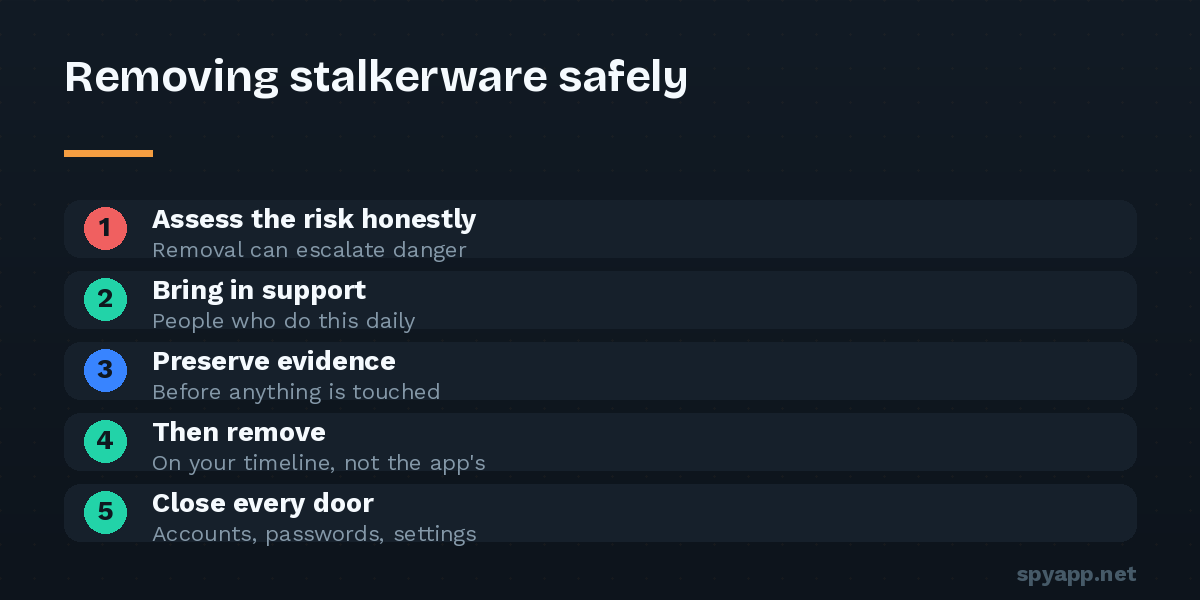
When you delete stalkerware, the installer’s dashboard goes quiet. Many commercial products go further and actively notify the installer of tampering — some the moment you open the app’s settings page, before you’ve removed anything. From the abuser’s perspective, the message is unmistakable: they found it, and they know what I did.
For some situations, that moment passes without danger. For others — particularly where there’s a history of controlling or abusive behavior — the loss of access and the exposure can escalate risk. You know your situation; this article’s job is to make sure the decision about timing is one you make deliberately, not one the uninstall button makes for you.
Step 1: Assess, honestly
Three questions, answered to yourself:
- Who almost certainly installed this? Stalkerware requires physical access to your unlocked phone — the candidate list is short.
- How has this person responded to losing control before? Past behavior when boundaries were set is the best predictor available.
- What does your gut say about their reaction to being discovered? People in monitored relationships usually have well-calibrated instincts they’ve been taught to doubt. Don’t doubt them here.
If the answers are unalarming — an overstepping family member, a situation already safely ended — you can move through the remaining steps quickly. If any answer raises your pulse, the next step is the most important one on this page.
Step 2: Bring in people who do this every day
Domestic-violence support organizations handle stalkerware routinely now. They will not find this strange, and they can help with exactly the things a security website can’t: safety planning around the moment of removal, safe communication channels in the meantime, local legal options, and — where it’s relevant — coordinating removal timing with other steps like leaving, reporting, or obtaining protective orders.
The Coalition Against Stalkerware (stopstalkerware.org) maintains a country-by-country directory of organizations and hotlines. If your phone may be monitored, make the contact from a different device: a friend’s phone, a work computer, a library. That caution applies to researching this topic generally — including, frankly, reading this page.
Step 3: Preserve the evidence — before anything is touched
Covertly installing surveillance software on another adult’s phone is a crime in most jurisdictions, and prosecutions happen. But deleted stalkerware is hard to prove. If there is any chance you’ll want legal options — even if you’re unsure today — document first:
- Use a different camera (not the monitored phone) to photograph: the app’s entry in Settings → Apps, its permission screens, its entries in Accessibility and Device admin lists, and any dashboard or account evidence you have access to.
- Note dates: when symptoms started, when access could have happened, what the person knew that they shouldn’t have.
- Consider a forensic image. If you report to police, an intact phone is far more valuable than screenshots — investigators can image the device. Some victims maintain the monitored phone untouched (using a separate safe device for real life) until law enforcement has seen it. A support organization can advise what’s worth preserving in your jurisdiction.
- Identify the file if you can. Exporting the app’s APK and scanning it with our free scanner gives you the product’s identity and capabilities in a report — useful both for understanding what was taken and for describing the software precisely later.
Step 4: The removal itself
When the timing is right by your plan, the technical part is straightforward — stalkerware is an ordinary app with two defenses, removed in order:
- Airplane mode on — freezes uploads and remote commands while you work.
- Revoke device admin: Settings → Security → Device admin apps → the app → deactivate. (Until this, the uninstall button stays grey.)
- Revoke Accessibility: Settings → Accessibility → the app → off.
- Uninstall: Settings → Apps → the app → Uninstall. If it resists or its pages keep closing, reboot into safe mode (long-press the on-screen Power off button) and repeat — in safe mode it cannot fight back.
- Or skip 2–4 with a factory reset — the certainty option, covered in our reset guide: set up as new afterward, never from a full backup.
Step 5: Close every door, not just the app
The app was the symptom; access was the disease. Same day:
- New PIN the person has never seen entered; remove any fingerprints or face entries that aren’t yours (Settings → Security — count the fingerprints).
- Google account, from a clean device: new password, two-factor authentication via authenticator app, sign out unknown devices, and check the recovery email and phone — abusers plant their own to regain access.
- Messaging apps: review linked devices in WhatsApp/Telegram and sign out everything unfamiliar.
- Location shares: Google Maps location sharing and family/couple apps — end anything you didn’t choose or no longer choose.
- Carrier: dial
*#21#to check call forwarding; set a carrier PIN against SIM swaps.
Step 6: Afterward
Expect the discovery to surface in the relationship if it’s ongoing — the dashboard went dark, after all. Decide in advance, ideally with your support contact, what you want to say and what you don’t owe an explanation. Watch the phone for a re-infection attempt (the warning signs now read like a checklist you own), and remember the one fact that protects you permanently: stalkerware needs your unlocked phone in their hands. That is the door, and it’s yours to keep shut.
You weren’t paranoid. You were right, you handled it in the right order, and the watching is over.