Android’s permission system is the deal every app must make with you: it can only touch what you let it touch. Most malware doesn’t break that deal — it talks its way through it, requesting access that has nothing to do with the app’s stated purpose and counting on you to tap “Allow” without reading. Learning to read a permission list takes about ten minutes. Here is the tour, organized by how much damage each permission can do.
The principle that does all the work
One question evaluates any permission: does the app’s purpose explain this access? A navigation app requesting your location is the deal working as intended. A flashlight requesting your location is the deal being abused. You don’t need to know what every permission technically does — you need to notice when the request and the purpose don’t rhyme.
The surveillance tier: permissions that read your life
These are the permissions spyware is built from. Any one of them deserves a pause; several together in an app with no obvious need is a verdict.
SMS access (read / receive / send). Reading your texts means reading your two-factor authentication codes — the keys to your accounts. Receiving SMS lets malware intercept those codes silently; sending enables premium-SMS fraud that bills you directly. Almost no normal app needs any of these.
Call logs and phone state. Who you called, who called you, when, for how long — a complete social map. “Process outgoing calls” is rarer and worse: it can monitor or redirect calls as you place them.
Microphone (RECORD_AUDIO). Voice apps, recorders and video apps need it. Anything else holding it can listen — and combined with auto-start (below), can listen when you’ve never opened the app.
Camera. Same logic. Camera apps, video calls, document scanners: fine. A camera permission in a wallpaper app is an eye, not a feature.
Fine and background location. Maps, weather, delivery: explained. The dangerous variant is background location — tracking while the app isn’t open. Android asks for it separately precisely because it’s a tracker’s favorite. “Allow only while using the app” exists for a reason; use it.
Contacts. Your entire address book, exportable in a second — valuable to spammers, scammers and stalkers alike. Messaging apps have a case; games and tools don’t.
The special-access tier: what spyware really wants
These don’t appear in normal permission pop-ups — they live in their own settings screens, because each is more powerful than everything above combined.
Accessibility services. Built for users with disabilities, an accessibility service can read everything on screen and act on your behalf: read every chat in every app, watch passwords as you type, tap buttons by itself. It is the single most abused mechanism in Android malware — modern banking trojans and stalkerware are essentially Accessibility abuse with a dashboard. Any app requesting Accessibility access must have an obvious accessibility purpose; “needed for the app to work properly” is not one.
Device admin. Designed for corporate device management, it lets an app enforce policies — and resist uninstallation. Spyware takes it for exactly that reason. Outside of Find My Device and workplace apps, treat requests for it as hostile.
Notification access. An app with notification access reads every notification — which, since notifications preview messages, means reading your chats without touching the chat apps. Quiet and underrated.
Display over other apps (overlay). Lets an app draw on top of whatever you’re using. Banking malware uses it to paint a fake login screen over your real banking app. Legitimate for chat bubbles and screen filters; suspicious almost everywhere else.
Install unknown apps. An app holding this can install other apps — the mechanism behind droppers, where a clean-looking app later pulls down the real malware.
Red-flag combinations: where the story is told
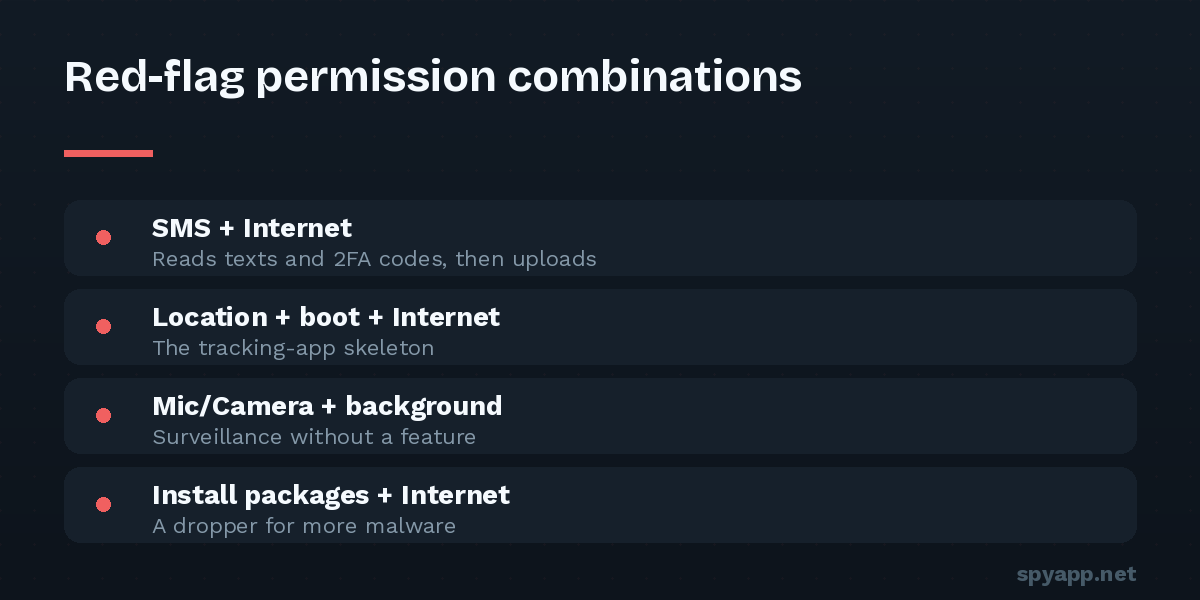
Single permissions can be innocent; combinations have plots. The ones we score most heavily in scan reports:
- SMS access + internet — read codes, send them home: account-takeover kit.
- Microphone + auto-start on boot — listening that survives reboots: bugging kit.
- Accessibility + overlay — read the screen, fake the screen: credential-theft kit.
- Location + camera + microphone + contacts in one unrelated app — not a feature set; an inventory of you.
- Any of the above + no launcher icon — surveillance that hides is stalkerware by definition.
What “normal” looks like, for calibration
A reasonable flashlight: camera permission only if it uses the camera flash — and nothing else. A reasonable offline game: network for ads, maybe vibration — and nothing else. A reasonable wallpaper app: storage on older Android versions — and nothing else. Hold every casual app to that standard and the malicious ones stand out like a stranger at a family dinner.
Note the inverse isn’t reassurance: malware sometimes requests few permissions at install and escalates later, or uses one Accessibility grant to do everything. Few permissions is a good sign, not a guarantee — behavior and signatures still matter, which is why scanning beats eyeballing.
How to actually read a permission list
You have three chances to catch a bad deal:
- Before installing: upload the APK to our free scanner — the report lists every requested permission in plain English, flags purpose mismatches, and checks the special-access tier that store listings gloss over.
- During first run: Android asks for dangerous permissions one at a time, in context. Deny anything unexplained — modern apps must handle denial gracefully, and most run fine without.
- Anytime after: Settings → Privacy → Permission manager shows the question inverted — for each permission, which apps hold it. Browse “SMS”, “Microphone” and “Location” occasionally; revoke freely. Android’s auto-revoke for unused apps helps, but it doesn’t touch the special-access tier — audit Accessibility and device admin yourself using our hidden-apps checklist.
The bottom line
Permissions are the rare security mechanism that puts the decision entirely in your hands, in advance, in writing. Malware’s whole strategy is betting you won’t read the contract. Read the contract — or let a scanner read it to you in thirty seconds. Either way, the flashlight doesn’t get your contacts.